
Look closely at a conventional change program and every component points in the same direction: outward. Announcement, webinar, portal, newsletter, office hours — information leaves the center and travels to the edge. That works when the center knows the answer, which, in most change efforts, it does. You’re moving people from System A to System B or asking them to stop leaving food in the community fridge over the weekend.
AI breaks that assumption. Leaders know they want people to “use AI,” but they don’t know:
- Which roles should use it for which tasks
- What people are already quietly doing with the tools
- Which use case would transfer cleanly across departments
None of that is knowable from the center as it lives at the edge, in the texture of daily work. And a broadcast has no return path: all speakers, no sensors. The single most valuable thing an AI program could learn — how the work actually meets the tool — never makes it back.
This calls for a new perspective: an AI adoption program isn’t just a communications plan. It should be a closed loop. Every part needs to do two things at once: send information out and bring insights back in. If a component only pushes information, it becomes unnecessary overhead.
Discover: Use Cases Don’t Self-Report
The usual instinct is to ask for input through a survey, a suggestion box, or by asking managers where AI could help. But this approach fails for two reasons.
- Altitude: If you ask a manager how their team should use AI, you’ll likely get a confident but generic answer. Managers understand the results their teams deliver, but not the details of the work itself. The people being asked don’t see the work, and those doing the work aren’t asked.
- Awareness: Most employees don’t have a clear idea of what these tools can do, and they know even less about what they’re allowed to do within their organization. You can’t suggest a use case for a feature you don’t know exists.
That’s why at SEI, we run discovery as a structured workshop, not a survey, built on two rules.
- The doers are in the room: Present, not represented by their leadership.
- Teach before we ask: Walk people through what these tools can genuinely do in their specific environment, then ask them to tie it to the work on their own desk.
The best use cases are found where role-specific knowledge meets tool-specific capability, and neither expert can find them alone. The workshop brings capability knowledge into the room and gathers use cases in the same ninety minutes. This pattern is repeated in every component that follows.
Enable: Generic Training Manufactures Skeptics
What a user can do depends a lot on licensing, available applications, and system setup. This means generic training can be worse than no training at all. Public tutorials are made for a general setup. They show features your organization might not have, in apps your users can’t access, using settings they can’t change. When people can’t follow the steps, they don’t blame the tutorial. Instead, they think the tool is broken or that they’re not good at it, and they share this with their team. Generic training doesn’t just fail to encourage adoption — it creates skeptics on a large scale.
The biggest challenges often happen with Copilot, where organizations frequently turn off features like agents, notebooks, or web search without telling users. If you ask Copilot, “Can I create an agent?,” in our experience, it usually says yes and offers to help, even if you don’t have access. The user then runs into a problem with no explanation and adds another complaint to the list of things that don’t work.
Two things should travel with every rollout:
- Training scoped to what the user can genuinely do in their real environment — and rebuilt as the tool changes.
- An explicit, plain-language list of what the tool can and cannot do in this organization.
Every session is recorded, turning a training event into a training asset: a cost you pay once becomes a library that keeps paying.
Enablement should gather feedback as well as share information. A live session is the easiest way to collect insights: the questions people ask, the ones they repeat, and the moments when the room goes quiet all show you where to focus next. Record these questions just as you record the session, or else you’ve created a speaker without a microphone.

Distribute: Ideas Don’t Cross Boundaries On Their Own
A brilliant use case invented in one region is worth a fraction of its potential if it stays there. Organizational boundaries are where good ideas go to die. The loop needs three intentional ways to share ideas, each moving them differently.
Use-Case Contests
A few simple rules make a big difference. Every submission must be based on real work, not a hypothetical, so each entry is proof, not just a possibility. Each one must include the prompt, so colleagues can copy it. Every employee gets one vote. This last rule is key: a single, non-divisible vote gives everyone a reason to look at a colleague’s use case and really understand it. This isn’t just a click; it’s a moment of real understanding.
In one adoption program SEI ran for a Fortune 500 client, hundreds of people each spent a few minutes absorbing how a colleague in a different function had solved a real problem with AI.
The contest’s second dividend is people. Strong submissions surface your power users by name — the experts you call when a team hits a wall, the demo bench for everything that follows.
Spotlight Sessions
These sessions combine a short teaching segment on one capability with a real employee showing a real use case from their own job, always in that order. Teaching by itself gives knowledge without confidence; a demo alone gives confidence without knowledge. The main goal of Spotlight is to transfer a proven use case to teams that didn’t create it. People don’t adopt a tool just because IT recommends it. They do it because a colleague nearby cut a recurring task from an afternoon to ten minutes and shared how they did it.
Learning Groups
Small groups of early adopters share their successes, challenges, and questions. These groups are the highest-bandwidth sensors you will ever place in the enterprise as they provide the return path that the broadcast model lacks. In an hour, a dozen people can explain how they use these tools, where they get stuck, and what they’ve created that hasn’t been reported. But once the call ends, all that information is lost unless it’s recorded.
Record every session, tag it by department and capability, and store it somewhere everyone in the organization can access. Recurring questions become your training backlog. Unofficial solutions can become contest entries and Spotlight topics. The archive turns into a knowledge base of real use cases, and eventually, a solid resource for your AI support agents. A group that meets helps its members, but a group whose insights are captured becomes part of your organization’s infrastructure.
Multiply: Prepare the Tool, Not Just the People
There’s a channel that most adoption programs overlook: the one your AI tools can access. A licensed Copilot instance can usually read across Outlook, Teams, and SharePoint, but only within the user’s permissions. The key isn’t just the messages you send, but the materials you save.
If you publish your adoption content — training, capability lists, and real use cases — to a SharePoint site that users can access, it becomes material the assistant can find and cite. The tool then answers questions about your policies using your documents. This reduces hallucination risk, improves answer quality, and builds trust.
The caveat isn’t small: more indexed content does not mean better answers. Stale drafts, near-duplicate versions, and over-shared sites degrade retrieval, and the assistant will cite last year’s policy with precisely the same confidence as this year’s.
The multiplier only works on a governed library:
- One with an authoritative version
- A named owner
- A retirement date that somebody enforces
Publishing without that discipline doesn’t ground the tool. It teaches it to be wrong at scale.
And this channel has its own return path: the questions the assistant can’t answer well are a live map of your content gaps. Watch where the tool struggles, and you know what to publish next.
Most organizations treat AI enablement and information architecture as separate workstreams. At SEI, we treat them as one — the content you write to drive adoption is the content that makes the tool worth adopting.

The Circuit
Read end to end, these four functions aren’t a sequence — they’re a circuit. Use cases set the training agenda; training surfaces the questions; the contest turns answers into proof and names the people behind it; Spotlight carries that proof across boundaries; learning groups return what nobody reported upward; and every artifact lands where the tool itself can read it, so each pass through the loop makes the next one better.
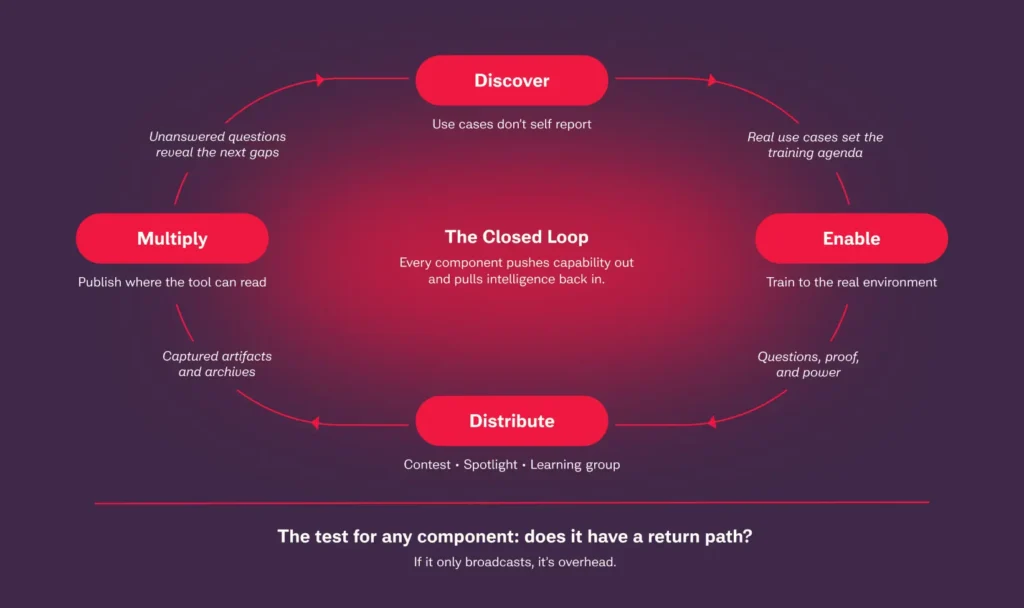
Closing the Loop
Most AI adoption programs stall for the same reason: they’re built to broadcast, not to learn. SEI designs and runs closed-loop adoption programs that start with structured discovery workshops and environment-specific enablement, so training reflects what your teams can actually do. From there, we build the distribution mechanisms that move ideas across silos and the content governance that makes your organization’s AI tools genuinely smarter over time.